
Executing the algoQA-Generated Scripts on LambdaTest
Execute algoQA-generated scripts on LambdaTest by uploading your app, triggering the build, and monitoring live test results.
Upload your app to LambdaTest, trigger the build, and monitor live test execution results for your algoQA-generated mobile automation scripts.
Executing the scripts on LambdaTest
Perform the following:
- Navigate to App Testing from the left panel.
- Click the Android icon.
- Click the Upload button to upload your respective APK file, then select the required device brand and device.
- Click the Start button to start the build.
- You will be connected to the selected device by launching the emulator where you can perform your testing. In this case, the Louise Philippe app is considered.
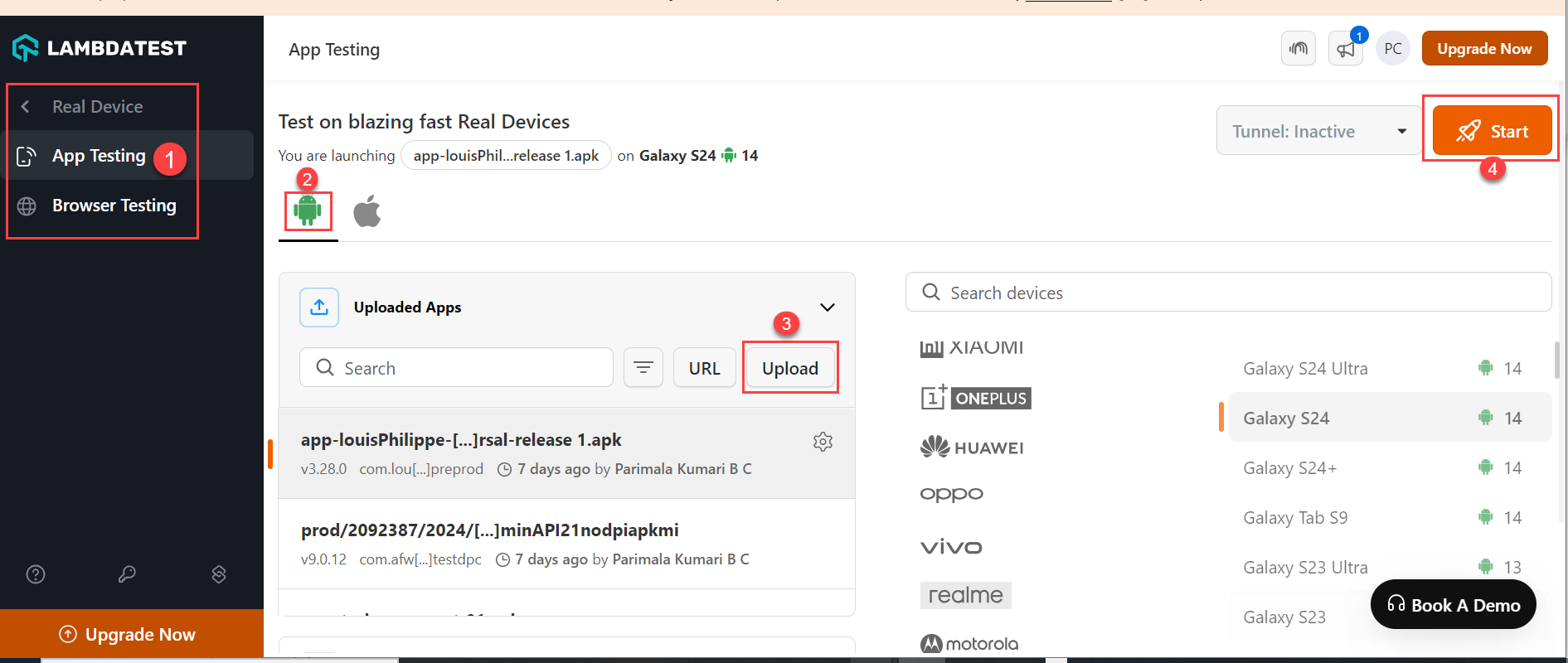
LambdaTest App Testing page with App Testing tab, Android icon, Upload button and Start button numbered - Similarly, you can perform testing on iOS devices too by selecting the appropriate options in the preceding screen.
Triggering the build in LambdaTest
Perform the following:
- Navigate to App Automation from the left pane by selecting Automation.

LambdaTest sidebar with Automation menu item highlighted - To run the build, follow the steps from step 4 to step 10 as described in the LambdaTest Integration to Execute Mobile App Automation Scripts for Android Devices article. When the build is triggered, the system captures the live recording of the steps.

App Automation live session with Commands list and Live device screen showing Allow notification prompt - You can perform the following while live recording the steps in LambdaTest:
- You can view your Network Logs, App Logs, and Device Logs.
- You can also view XPaths for a particular UI element/control after selecting the UI Inspector feature.
- With the device controls, you can change the keyboard language, the device orientation, put the device to sleep mode, and increase and decrease the volume.
- For more information on the preceding topics, refer to the topic in LambdaTest - Realtime Native Mobile App Testing.
Was this page helpful?