API Automation Using Patch Method
Using the PATCH method, you only send the data that needs updating, which can save bandwidth and reduce the amount of time taken for a webpage to load and become interactive. This method is helpful for mobile users or in situations where network connectivity is slow or unreliable.
Example
The following example request updates the user name and job in the database for an existing user.
Request:
PATCH https://api.example.com/users/{user_id}
Here, replace {user_id} with the actual user ID and ensure the URL is valid for the user you want to update.
Request Header:
Authorization: Bearer <Access-Token>
Content-Type: application/json
Here, replace <Access-Token> with the actual access token.
Request Body:
{
  "name": "<username>",
  "job": "<job title>",
  "updatedAt": "2024-07-15T07:20:33.050Z"
}
Here, replace with the actual username and job title. The updatedAt field is generated by the system to indicate when the update occurred.
Automating API Tests Using the PATCH Method in algoQA
API automation using the PATCH method is similar to other methods. You need to create a Request name, select PATCH as the type, and update the required details. For more information on creating a Request name and selecting the 'Type', refer to the API Automation Using API Collection. After clicking the 'Send' button to execute this method, you will see the response body.
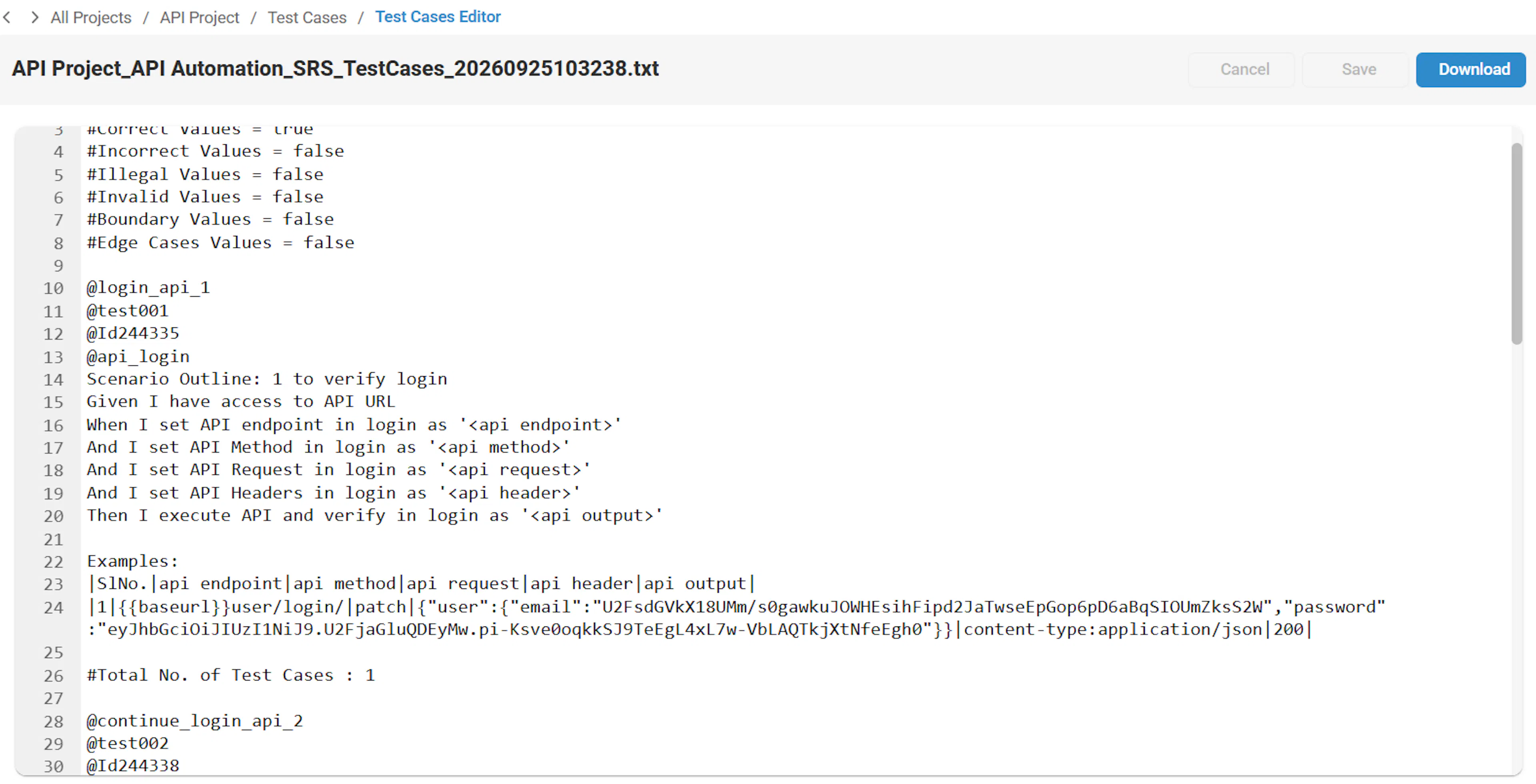
A system-generated Feature File is as follows. You can download the generated script and view the report and a unique ID will be generated for each test case.