
Generating Separate Module in a Separate Folder for API Automation
If you are working with different modules of user actions, such as create a user or create a profile, you can generate separate feature files. These files outline specific behaviors of the application. Each file will be organized into designated folders based on their module.
Generating Modules in a Separate Folder
To generate modules with a separate feature name within a separate folder, perform the following: Make sure to select the 'Group By Module' option from Settings>> Feature File Settings and click Update.

Adding a Separate Feature
In Projects, search for the appropriate API test automation project and select it.
In the left pane of API testing page, select the appropriate API collection and click on more option( 3 dots ) to select Separate Feature option, enter a name and click Submit.
Feature file name cannot contain special characters like $, ^, *, +, >, ?, |, (, ), {, <, [, ], or }.
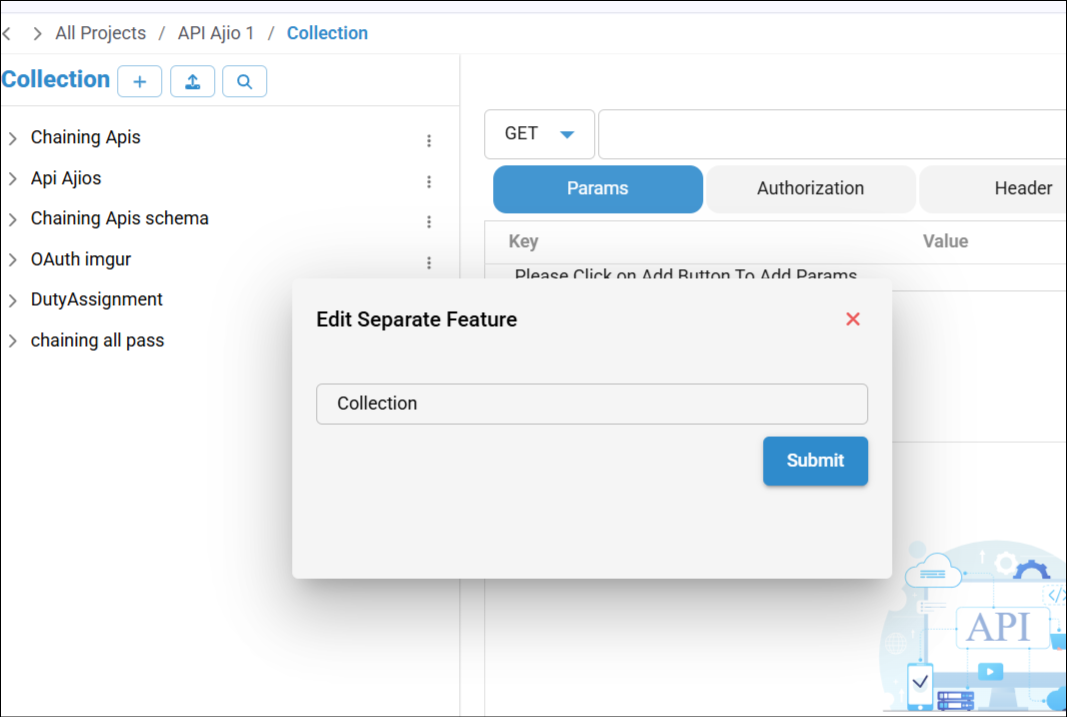
The Feature File will be generated module-wise in the Test Cases screen after generating script.
To access the feature file, navigate to the Test Cases.

If you don't provide the name for the particular request and still wish to generate a separate Feature file and Requirement option is checked, then it will be generated in the Request name provided.
Consolidated Feature Files for Multiple Collections
Assigning Feature Names:
When you create collections and assign a specific feature name (for example., "User Authentication and Management") to each collection, the system generates a consolidated Feature File.
Viewing the Consolidated Feature File:
This Feature File, named according to the provided feature name, will include a comprehensive list of all scenarios from the collections you specified. For example, if you have multiple collections and name them all with "User Authentication and Management," the resulting Feature File will aggregate all scenarios from these collections into a single file.
Accessing the Feature File:
Navigate to the Test Cases to view this consolidated Feature File.
