
How to Automate Dynamic Workflows using algoQA
Learn how to automate dynamic workflows in algoQA using parameterization and the Record Scenario feature.
Using Parameterization
To automate dynamic workflows, leverage parameterization and record test steps using the Record Scenario feature.
Scenario 1
Consider a scenario where currency is to be verified for various countries.
As part of Test Design, configure the country and currency for the Control Name and Control Value.
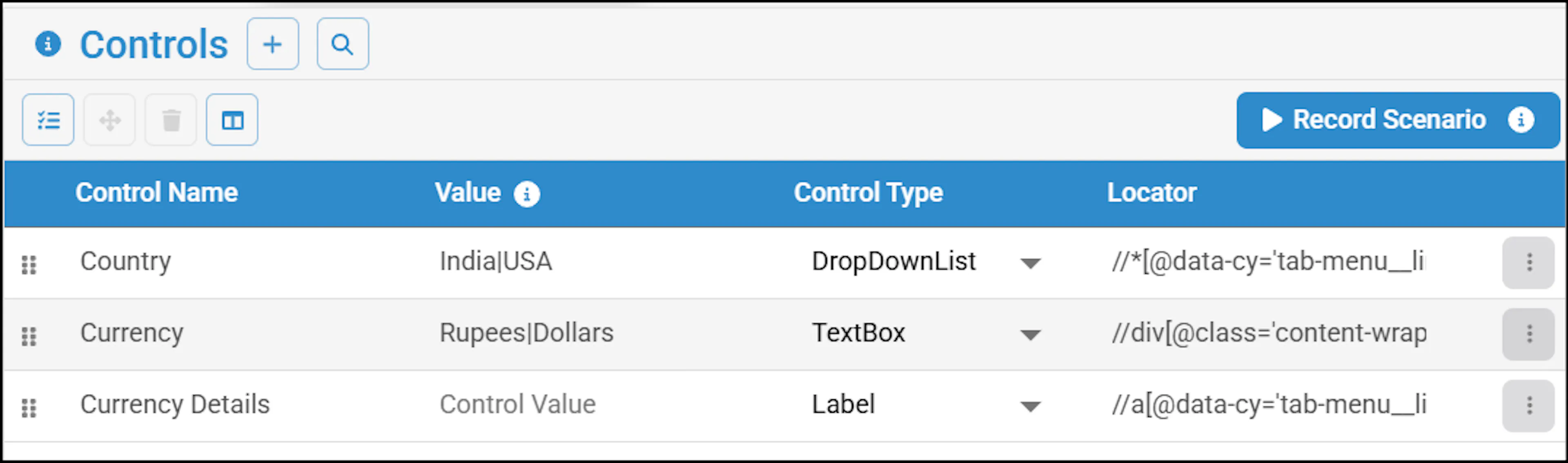
The system generates a Feature File:

Scenario 2
Consider another use case where you choose different types of loans in a banking application, and accordingly, the workflow varies.
Based on the choices, you can record the workflows for different choices using the Record Scenario feature. For example, you can choose Home Loan as the loan type and complete the recording of the workflow using the Record Scenario. The system generates the following Feature File:

Similarly, you can record the workflows for car and personal loans and generate test cases.