
Freemium Users
Get started with AlgoShack's free tier register as a Student or Company user and access core test design and web automation features at no cost. The Freemium model gives individual users lifetime free access to algoQA's core testing capabilities. Register as a Student or a Company professional to start designing tests, generating scripts, and running web automation at no cost. When you need more, upgrade to Pro or Enterprise from the My Subscription page.
Student Registration
Register as a working student to get freemium-only access. Provide your college name and personal details to create your account.
Company Registration
Register as a working professional to unlock all subscription options, including Freemium, Pro, and Enterprise. Provide your organization name, job title, and contact details.
How to Register as a Freemium User
Follow these steps to create your Freemium account:
- Enter the URL algoshack.com into the browser address bar.
- Click the Pricing button.

- The Pricing page appears. Click the Get Started button to subscribe as a Freemium user. You can view the available core features. For more information, visit the Pricing page.
- On the sign-up page, enter the required details, select the Terms and Privacy checkbox, and click Create. The left side of the page displays the list of features included in your subscription.
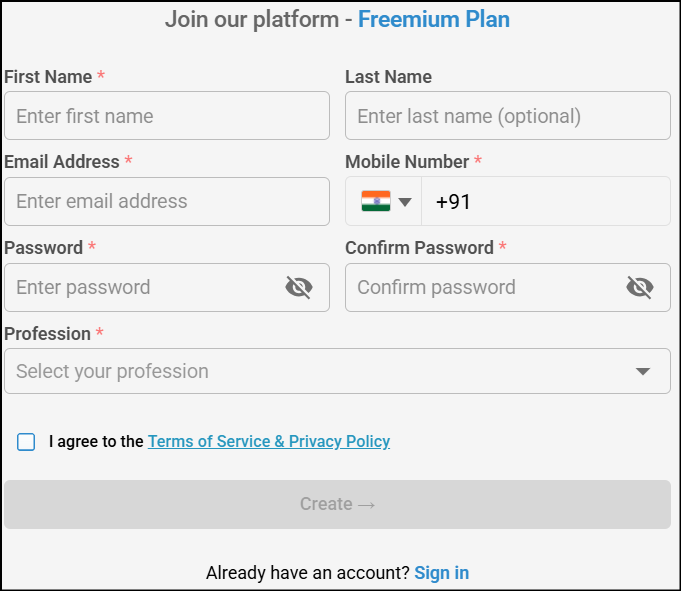
- Choose your registration path:
- Register as a Student — Grants access to the Freemium subscription only.
- In the Sign up for Freemium page, enter the required details (first name, last name, email, password, country code, mobile number) and choose the Working Student option from the Select your profession dropdown list.
- After selecting your profession, provide the following additional information:
- College Name
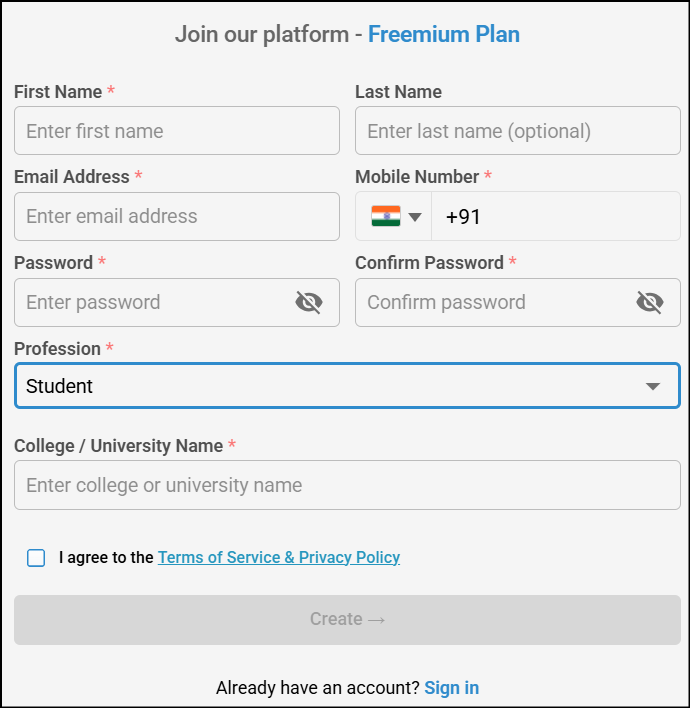
- Select the Terms and Privacy Policy checkbox and click Create.
- Register as a Company — Grants access to all subscription options, including Freemium, Pro, and Enterprise.
- In the Sign up for Freemium page, enter the required details and choose the Working Professional/Employee option from the Select your profession dropdown list.
- After selecting your profession, provide the following additional information:
- Organization Name
- Job Title
- Mobile Number
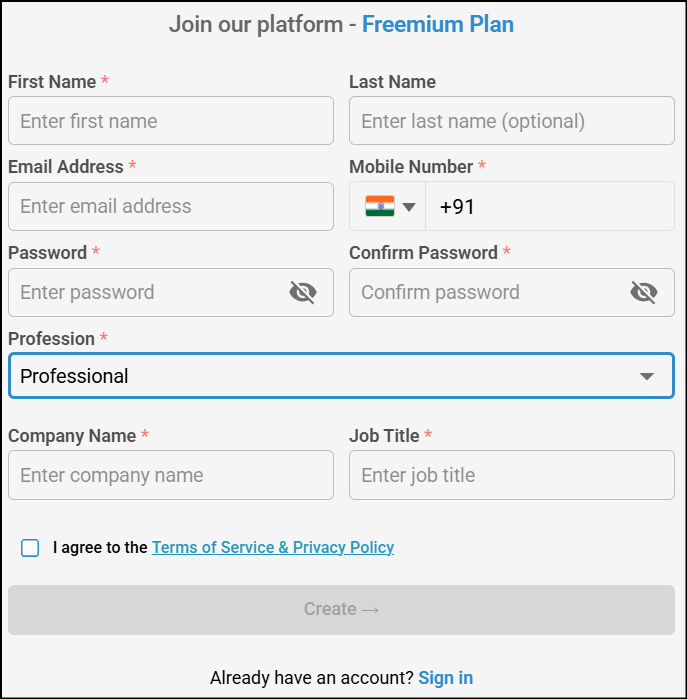
- Select the Terms and Privacy Policy checkbox and click Create.
- You will receive an email at your registered email address confirming that your account is being processed, followed by a confirmation email once it is approved.
- You can sign in once you receive the confirmation email.
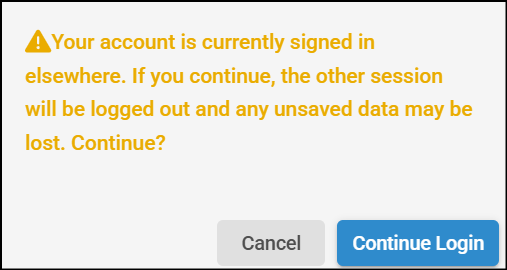
- If the same account is used on a different device, a pop-up notification appears indicating that an active session already exists. You will be prompted to confirm whether you want to continue. If you choose to continue, the new session is activated and the previous session is logged out automatically. A notification email is then sent to the registered email address with the login details, prompting you to review the activity if it was not initiated by you.
- Register as a Student — Grants access to the Freemium subscription only.
Freemium users can generate up to 15 test cases with 250 MB of storage. To unlock unlimited test cases, expanded storage, and advanced automation capabilities, upgrade to the Pro or Enterprise subscription model from the My Subscription page.